
The apps you already run — from your phone, laptop, anywhere.
Install Raemote on your computer. Scan a QR code with your phone —
or pair raemote connect and open the same apps in a browser.
Either way, the apps you already run — your media, your dashboards, your
notes, your projects — are right there, end-to-end encrypted, with nothing
exposed to the internet.
If you've ever set up a tunnel, a VPN or a reverse proxy just to reach your own stuff from outside — this is the short way to do it.

- No account
- Nothing exposed to the internet
- End-to-end encrypted
- Works through a relay when needed
- Open source, AGPL-3.0
Three steps
Install. Scan. Done.
-
Install on your computer
One command on macOS or Linux. It installs a small background service that finds the web apps you already run.
-
Scan the QR code
Run
raemote pairand scan it with the Raemote app — or paste the link intoraemote connecton a computer. The link is short-lived and can pair more than one device until it expires. -
Open an app
Your apps appear as a list. Tap one and it opens in Safari, logged in exactly as it is at home.
curl -fsSL https://github.com/raemote/raemote_cli/raw/main/install.sh | shPrefer the Gitee mirror on networks where GitHub is slow:
curl -fsSL https://gitee.com/pppkin/raemote_cli/raw/main/install.sh | sh
What people do with it
Small things, from anywhere
Raemote doesn't do one big thing. It puts the small, useful things within reach — the checks you don't want to wait until you're home for.
-
At home
Check on things
Did the backup finish. Is the NAS up. What's the temperature. The camera, from the sofa.
Jellyfin · Immich · Home Assistant · Uptime Kuma
-
Work
Get to work away from home
Move a card on the board. Review a pull request. See if the build passed. Open the admin panel.
Vikunja or Planka · Forgejo or Gitea · Woodpecker · Portainer
-
Money
Skip a monthly subscription
The feed reader, the bookmarks, the document archive, the recipes, the budget — yours, on your own machine.
Miniflux · Linkding · Paperless · Mealie · Actual
-
Building
Reach the thing you're making
A dev server, a preview, a notebook, a database admin — running on the machine in front of you, opened from your pocket.
Dev servers · Jupyter · code-server · Adminer
-
Sharing
Share with one person
Pair a family member's device with its own identity, and take it away again whenever you like.
One device each · revoke any time · no shared logins
-
Browser
Or from a browser
raemote connectpairs a computer as a regular device and serves the same apps in your browser — the same tunnel the phone app uses.One command · logins kept · revoke it like any device
Why it exists
The long way, and the short way
Reaching your own machines from outside the house usually means a small networking project. There's nothing wrong with enjoying that project — but it shouldn't be the price of checking your cameras.
-
The long way
A stack to maintain
- A public IP or a small VPS
- A domain name and DNS
- A certificate and a reverse-proxy config
- A VPN client on your phone
- Firewall rules, and keeping them patched
-
The short way
One command, one QR code
- Install Raemote on the machine you already have
- Scan the QR code with the app
- Tap an app — it opens, logged in
- Nothing published to the internet
If you already enjoy the long way, keep it. Raemote doesn't need any of it, and doesn't get in the way.
Features
What Raemote does for you
-
Discovery
It finds your apps
Raemote reads the machine's list of listening sockets — no port scanning, no configuration — and gives each web app a name from its page title. New apps show up on their own.
-
The phone app
Real apps in real Safari
Apps open in the system browser view, each on its own stable origin, so logins, cookies and local storage survive closing the app and coming back days later.
-
The phone app
Several apps at once
Open apps stay running as background tabs. Switching between them is instant and keeps the page exactly where you left it.
-
The browser client
The same apps, in a browser
raemote connectpairs a computer like any other device and serves your apps in a desktop browser over the same encrypted tunnel — every app on its own origin, logins and all. Open several at once as browser tabs. -
Connection
Encrypted, direct when possible
Your device talks straight to your computer when the network allows it. When it doesn't, a public relay forwards the traffic without being able to read a byte of it.
-
Connection
Works on awkward networks
An outbound HTTP proxy is a supported option for networks that block the usual paths — so Raemote still works on hotel, campus or corporate Wi-Fi.
-
Control
You decide who is in
List paired devices, give them readable names, revoke any of them instantly, and invite a new device with a one-time code — from the app or the command line. Every paired device can reach all your apps, or only the ones you allow.
-
Operate
Made to be checked
raemote doctorhealth-checks the daemon, permissions, config, discovery and relay.raemote logsshows what happened. The service is managed by launchd or systemd. -
Trust
Open source, AGPL-3.0
Raemote runs inside your home and holds keys to your private services, so the server and the app are public and auditable. Read the code, or the threat model.
How it works
Two pieces, one private connection
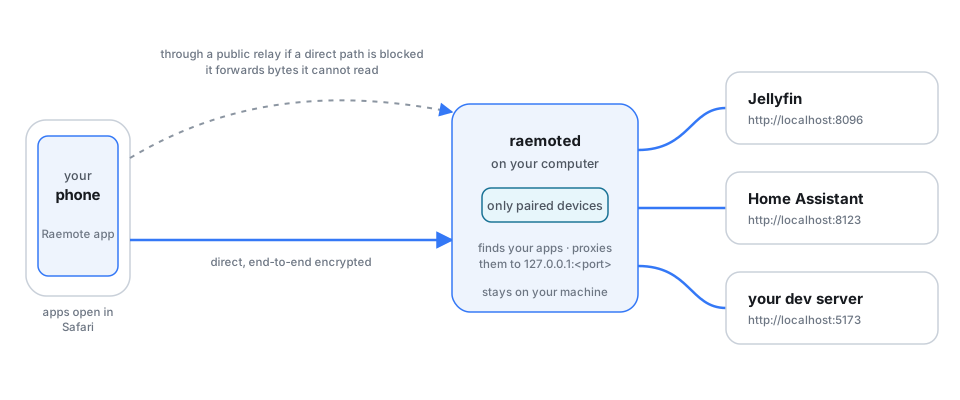
A small server, raemoted, runs on the computer that
holds your apps. A client shows what it found and opens them — the Raemote
app on your phone, or raemote connect in a browser. There is no
account and no cloud service in the middle.
Under the hood
The connection is iroh over QUIC: peers find each other and try to connect directly, and a public relay is used only when a direct path is not available. The traffic is end-to-end encrypted either way.
Two application protocols run over it. raemote/bind/0 exists
only to pair a device with a short-lived token; raemote/0 serves
the small HTTP API (/_hub/catalog, /_hub/info,
/_hub/devices, /_hub/discover) and reverse-proxies
/app/<name>/… to the app's real address.
On the client's side, a loopback proxy gives each app its own origin, so nothing else on the device can reach it — on iOS it is gated by a per-launch secret, in the browser client by a host check. Requests are streamed — bodies, uploads, server-sent events and WebSockets all pass through untouched.
Trust
Only devices you paired get in
Pairing happens once. After that, every device — your phone, a
laptop running raemote connect, a friend's phone — is recognised
by its cryptographic identity: there is nothing to log in to and no token to
keep safe.
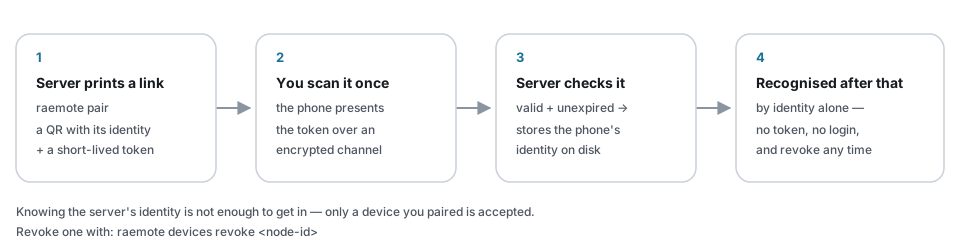
- Paired identities are stored on the server; a lost phone is revoked in one command.
- Each paired device can be limited to only the apps you allow; an invitation can only narrow the sender's own access, never widen it.
- Failed pairing attempts lock the token out; tokens expire on their own.
- Nothing is published to the public internet — apps are reachable only from paired devices.
Want the details? The threat model is public — what Raemote defends against, and what it deliberately doesn't.
The other client
Raemote in a browser: raemote connect
raemote connect is a full client in its own right: it pairs a
computer with the very same link and QR code the app uses, over the very
same encrypted tunnel, and serves your apps in a desktop browser:
raemote connect              # reopen the last server
raemote connect '<link from raemote pair>'
The app list is served on 127.0.0.1:7788 and every app
gets its own loopback port, so URLs, cookies and logins behave exactly as they
do on the server. The paired computer appears in
raemote devices list like any other device — name it, restrict it
with --ports, revoke it.
Plain words
Five words we'll use once
- App
- Something with a web page — like the sites you open in a browser.
- Server
- The computer your apps run on. For Raemote, that's the machine Raemote is installed on.
- Port
- The number a web app listens on, like
localhost:3000. - Localhost
- Your own computer, as seen from your own computer.
- Relay
- A public middleman that forwards your traffic when a direct line isn't possible. It can't read what passes through.
Straight answers
Where Raemote stands today
Not yet — and on the way:
- Apps that only speak HTTPS (anything you've put behind a certificate) aren't reachable yet. Plenty of self-hosted software serves plain HTTP out of the box, and that works today.
- No push notifications yet — you open the app to check.
- Apps need to run on the machine Raemote is installed on.
And never:
- It won't put your apps on the public internet.
- It won't replace an app's own login — you still sign in to each app.
- It won't protect a phone that's already compromised.
- It isn't a file-transfer service or a remote desktop.